Command
命令をクラスにする
概要
命令の集まりを履歴として保存して、取り消したりやり直したりできる
マンガでわかる Command
マンガでわかる Command #デザインパターン - Qiita
でざぱたんで覚える Command
ちびキャラは「コマンドたん」。夜中に現れて仕事を片付けていく小人たちで、全員同じ見た目なのに一人ひとりできることが違い、できるのは「自分の為せることを為す」と「為したことを戻す」の二つだけ。やること一式を握った小人=手続きとパラメータを束ねたオブジェクトで、小人を一列に並べて順に働かせれば何でも実行できるし、何でも巻き戻せる。命令のリスト化とundo/redoというCommandの二大効能を昔話仕立てで覚えられる。
出典: いしだけ『でざぱたん: ちびキャラで覚えるデザインパターン』(P.004〜)
登場人物
- Command: インタフェース
- ConcreteCommand
- Reciever: Commandの命令実行対象
- Client: ConcreteCommandを生成して、Recieverを割り当てる
- Invoker: 命令実行開始役
クラス図
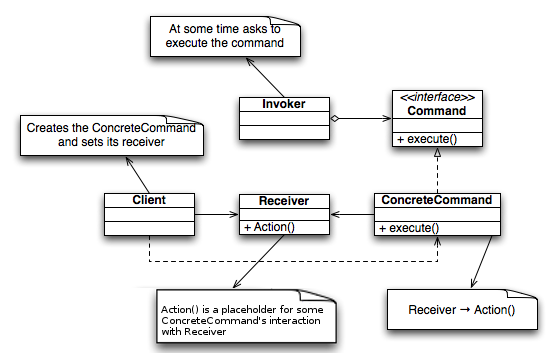
このサイトの実装(お絵かき履歴)での対応関係:
classDiagram
  class Command {
    <<interface>>
    +execute()
  }
  class MacroCommand {
    -commands Stack
    +execute()
    +append(cmd)
    +undo()
    +clear()
  }
  class Drawable {
    <<interface>>
    +draw(x, y)
  }
  class DrawCommand {
    #drawable Drawable
    -position Point
    +execute()
  }
  class DrawCanvas {
    -color Color
    -radius int
    -history MacroCommand
    +paint(g)
    +draw(x, y)
  }
  class JFrame
  class Main {
    -history MacroCommand
    -canvas DrawCanvas
    -clearButton JButton
    +actionPerformed(e)
    +mouseDragged(e)
  }
  Command <|.. MacroCommand
  Command <|.. DrawCommand
  Drawable <|.. DrawCanvas
  JFrame <|-- Main
  MacroCommand o-- Command : commands
  DrawCommand o-- Drawable : drawable
  Main *-- MacroCommand : history
  Main *-- DrawCanvas : canvas
  Main ..> DrawCommand : creates
やり方
(やり方いまいち理解してない...)
メリット(用途)
関連
Java
実装例のクラス図
classDiagram
  class Command {
    <<interface>>
    +execute()
  }
  class MacroCommand {
    +execute()
    +append()
    +undo()
    +clear()
  }
  class Drawable {
    <<interface>>
    +draw()
  }
  class DrawCommand {
    #drawable : Drawable
    -position : Point
    +DrawCommand()
    +execute()
  }
  class DrawCanvas {
    -history : MacroCommand
    +DrawCanvas()
    +setSize()
    +setBackground()
    +paint()
    +draw()
  }
  Command <|.. MacroCommand
  Command <|.. DrawCommand
  DrawCommand o-- Drawable
  Drawable <|.. DrawCanvas
DrawCanvas o-- MacroCommandpackage command;
public interface Command {
public abstract void execute();
}
package command;

import java.util.Stack;
import java.util.Iterator;

public class MacroCommand implements Command {
    // 命令の集合
    private Stack commands = new Stack();

    // 実行
    public void execute() {
        Iterator it = commands.iterator();
        while (it.hasNext()) {
            ((Command) it.next()).execute();
        }
    }

    // 追加
    public void append(Command cmd) {
        if (cmd != this) {
            commands.push(cmd);
        }
    }

    // 最後の命令を削除
    public void undo() {
        if (!commands.empty()) {
            commands.pop();
        }
    }

    // 全部削除
    public void clear() {
        commands.clear();
    }
}
package drawer;

public interface Drawable {
    public abstract void draw(int x, int y);
}
package drawer;

import command.Command;

import java.awt.Point;

public class DrawCommand implements Command {
    // 描画対象
    protected Drawable drawable;
    // 描画位置
    private Point position;

    // コンストラクタ
    public DrawCommand(Drawable drawable, Point position) {
        this.drawable = drawable;
        this.position = position;
    }

    // 実行
    public void execute() {
        drawable.draw(position.x, position.y);
    }
}
package drawer;

import command.*;

import java.util.*;
import java.awt.*;
import java.awt.event.*;
import javax.swing.*;

public class DrawCanvas extends Canvas implements Drawable {
    // 描画色
    private Color color = Color.red;
    // 描画する点の半径
    private int radius = 6;
    // 履歴
    private MacroCommand history;

    // コンストラクタ
    public DrawCanvas(int width, int height, MacroCommand history) {
        setSize(width, height);
        setBackground(Color.white);
        this.history = history;
    }

    // 履歴全体を再描画
    public void paint(Graphics g) {
        history.execute();
    }

    // 描画
    public void draw(int x, int y) {
        Graphics g = getGraphics();
        g.setColor(color);
        g.fillOval(x - radius, y - radius, radius * 2, radius * 2);
    }
}
import command.*;
import drawer.*;

import java.awt.*;
import java.awt.event.*;
import javax.swing.*;

public class Main extends JFrame implements ActionListener, MouseMotionListener, WindowListener {
    // 描画履歴
    private MacroCommand history = new MacroCommand();
    // 描画領域
    private DrawCanvas canvas = new DrawCanvas(400, 400, history);
    // 消去ボタン
    private JButton clearButton = new JButton("clear");

    // コンストラクタ
    public Main(String title) {
        super(title);

        this.addWindowListener(this);
        canvas.addMouseMotionListener(this);
        clearButton.addActionListener(this);

        Box buttonBox = new Box(BoxLayout.X_AXIS);
        buttonBox.add(clearButton);
        Box mainBox = new Box(BoxLayout.Y_AXIS);
        mainBox.add(buttonBox);
        mainBox.add(canvas);
        getContentPane().add(mainBox);

        pack();
        show();
    }

    // ActionListener用
    public void actionPerformed(ActionEvent e) {
        if (e.getSource() == clearButton) {
            history.clear();
            canvas.repaint();
        }
    }

    // MouseMotionListener用
    public void mouseMoved(MouseEvent e) {
    }

    public void mouseDragged(MouseEvent e) {
        Command cmd = new DrawCommand(canvas, e.getPoint());
        history.append(cmd);
        cmd.execute();
    }

    // WindowListener用
    public void windowClosing(WindowEvent e) {
        System.exit(0);
    }

    public void windowActivated(WindowEvent e) {
    }

    public void windowClosed(WindowEvent e) {
    }

    public void windowDeactivated(WindowEvent e) {
    }

    public void windowDeiconified(WindowEvent e) {
    }

    public void windowIconified(WindowEvent e) {
    }

    public void windowOpened(WindowEvent e) {
    }

    public static void main(String[] args) {
        new Main("Command Pattern Sample");
    }
}
Go
Command/DrawableはどちらもJava版同様の真のinterfaceとしてそのまま移植できる(テンプレートメソッドの外出しが要らない、Strategy版と同じ単純なケース)。Java版のDrawCanvasはAWT/Swingを継承したGUI描画キャンバスだが、GUIを持たないこの移植では「描画命令(座標)を記録するだけのテキストベースのキャンバス」TextCanvasに置き換えている。paint(Graphics)が担っていた「背景を白紙に戻してから履歴を再生する」という暗黙の挙動(AWTのupdate()が背景クリアを肩代わりしている)は、Repaint()の中で明示的に点リストをクリアしてからhistory.Execute()を呼ぶ形にして再現した。
実行: go run ./GoF/patterns/Command/go
実装例のクラス図
classDiagram
  class Command {
    <<interface>>
    +Execute()
  }
  class MacroCommand {
  }
  class Drawable {
    <<interface>>
    +Draw()
  }
  class Point {
  }
  class DrawCommand {
  }
  class TextCanvas {
}package main
// Command はJava版 command.Command 相当のインタフェース。
// 命令を表す。実行できることだけを要求する。
//
// Go の interface は暗黙実装(implements を書かない)。
type Command interface {
Execute()
}
package main

// MacroCommand はJava版 command.MacroCommand 相当。
// 複数のCommandをまとめて1つのCommandとして扱う(自分自身もCommandを実装する)。
// これにより「マクロコマンドも、コマンドである」というCompositeパターンとの関連が成立する
// (command.mdの「関連」を参照)。
type MacroCommand struct {
	commands []Command // 命令の集合。Java版はStackだが、Goではスライスで代用する
}

// NewMacroCommand はコンストラクタ相当。
func NewMacroCommand() *MacroCommand {
	return &MacroCommand{}
}

// Execute は集めた命令を追加した順に実行する。
func (m *MacroCommand) Execute() {
	for _, cmd := range m.commands {
		cmd.Execute()
	}
}

// Append は命令を追加する。自分自身(m)を追加しようとした場合は無視する
// (Java版の `if (cmd != this)` と同じガード。循環参照によるExecute()の無限再帰を防ぐ)。
func (m *MacroCommand) Append(cmd Command) {
	if cmd != Command(m) {
		m.commands = append(m.commands, cmd)
	}
}

// Undo は最後に追加した命令を取り除く。
func (m *MacroCommand) Undo() {
	if n := len(m.commands); n > 0 {
		m.commands = m.commands[:n-1]
	}
}

// Clear は命令をすべて取り除く。
func (m *MacroCommand) Clear() {
	m.commands = nil
}
package main

// Drawable はJava版 drawer.Drawable 相当のインタフェース。
// 「(x, y)に何かを描く」ことだけを要求する。DrawCommandの描画対象(Receiver)。
type Drawable interface {
	Draw(x, y int)
}
package main

import "fmt"

// Point はJava版 java.awt.Point 相当。座標(x, y)を保持するだけの値。
type Point struct {
	X, Y int
}

// String は fmt.Stringer を満たす。
func (p Point) String() string {
	return fmt.Sprintf("(%d,%d)", p.X, p.Y)
}

// DrawCommand はJava版 drawer.DrawCommand 相当のConcreteCommand。
// 「どこに(Drawable)」「何を描くか(Point)」をカプセル化する。
type DrawCommand struct {
	drawable Drawable // 描画対象(Receiver)
	position Point    // 描画位置
}

// NewDrawCommand はコンストラクタ相当。
func NewDrawCommand(drawable Drawable, position Point) *DrawCommand {
	return &DrawCommand{drawable: drawable, position: position}
}

// Execute は実際の描画をReceiver(Drawable)へ委譲する。
func (c *DrawCommand) Execute() {
	c.drawable.Draw(c.position.X, c.position.Y)
}
package main

import (
	"fmt"
	"strings"
)

// TextCanvas はJava版 drawer.DrawCanvas 相当。
//
// Java版はjava.awt.Canvasを継承したGUI描画キャンバス(paint()でGraphicsに点を描く)だが、
// GUIを持たないこの移植では「描画命令(座標)を記録するだけのテキストベースのキャンバス」に
// 置き換える。Drawableインタフェースを実装する点(=DrawCommandのReceiverになれる点)は
// Java版と同じ。
type TextCanvas struct {
	width, height int
	history       *MacroCommand // 再描画(Repaint)時に再生する履歴。Java版DrawCanvasのhistoryフィールド相当
	points        []Point       // 現在キャンバスに描かれている点の一覧(Java版のGraphics上のピクセル相当)
}

// NewTextCanvas はコンストラクタ相当。
func NewTextCanvas(width, height int, history *MacroCommand) *TextCanvas {
	return &TextCanvas{width: width, height: height, history: history}
}

// Draw はJava版 DrawCanvas.draw(x, y) 相当。指定座標に点を描く(記録する)。
func (c *TextCanvas) Draw(x, y int) {
	c.points = append(c.points, Point{X: x, Y: y})
}

// Repaint はJava版 DrawCanvas.paint(Graphics) 相当。
//
// AWTでは再描画イベントが来ると、デフォルトのupdate()が背景を塗りつぶしてからpaint()を
// 呼ぶため、paint()の中身(history.execute()だけ)は「今の履歴だけを使って白紙から
// 描き直す」ことになる。ここではその暗黙の「白紙に戻す」処理をクリアとして明示してから
// history.Execute()を呼ぶことで、同じ意味を再現する。
func (c *TextCanvas) Repaint() {
	c.points = nil
	c.history.Execute()
}

// String はキャンバスの現在の状態(描かれている点の一覧)を表示用に整形する。
func (c *TextCanvas) String() string {
	if len(c.points) == 0 {
		return fmt.Sprintf("TextCanvas(%dx%d): (empty)", c.width, c.height)
	}
	strs := make([]string, len(c.points))
	for i, p := range c.points {
		strs[i] = p.String()
	}
	return fmt.Sprintf("TextCanvas(%dx%d): [%s]", c.width, c.height, strings.Join(strs, " "))
}
package main

import "fmt"

// 実行: go run ./GoF/patterns/Command/go
//
// Java版Main.javaはJFrame+DrawCanvasでマウスドラッグの軌跡を描画するGUIアプリだが、
// GUIを持たないこの移植では、マウスドラッグ相当の座標列をあらかじめ用意し、
// DrawCommandとして順に履歴(history)に積みながら実行する。
// clearボタンのハンドラ(history.clear(); canvas.repaint())も、
// 末尾で同じ手順として再現する。
// 加えて、command.mdの「関連」にある通り「マクロコマンドも、コマンドである」ことを
// 確かめるため、複数のDrawCommandをまとめたMacroCommandをそのままhistoryに積む例も示す。
func main() {
	history := NewMacroCommand()
	canvas := NewTextCanvas(400, 400, history)

	fmt.Println("--- mouseDragged相当: 点を描くたびにhistoryへ記録して即実行 ---")
	for _, p := range []Point{{10, 10}, {20, 10}, {20, 20}, {10, 20}, {10, 10}} {
		cmd := NewDrawCommand(canvas, p)
		history.Append(cmd)
		cmd.Execute()
	}
	fmt.Println(canvas)

	fmt.Println("--- undo: 直前の1手を履歴から外し、履歴だけを使ってrepaint ---")
	history.Undo()
	canvas.Repaint()
	fmt.Println(canvas)

	fmt.Println("--- macro: 複数のDrawCommandをまとめたMacroCommand自体を1つのCommandとしてhistoryに積む ---")
	triangle := NewMacroCommand()
	triangle.Append(NewDrawCommand(canvas, Point{100, 100}))
	triangle.Append(NewDrawCommand(canvas, Point{120, 100}))
	triangle.Append(NewDrawCommand(canvas, Point{110, 120}))
	history.Append(triangle)
	triangle.Execute()
	fmt.Println(canvas)

	fmt.Println("--- clear相当: 履歴を空にしてrepaint(キャンバスが空になる) ---")
	history.Clear()
	canvas.Repaint()
	fmt.Println(canvas)
}
PHP
実装例のクラス図
classDiagram
  class ShellCommand {
    <<interface>>
    +execute()
    +undo()
  }
  class MakeDirectoryCommand {
    +__construct()
    +execute()
    +undo()
  }
  class RemoveDirectoryCommand {
    +__construct()
    +execute()
    +undo()
  }
  class ShellScript {
    +add()
    +next()
    +undo()
    +run()
  }
  class FileSystem {
    +__construct()
    +changeDirectory()
    +makeDirectory()
    +exec()
    +removeDirectory()
    +createFile()
  }
  ShellCommand <|.. MakeDirectoryCommand
ShellCommand <|.. RemoveDirectoryCommand<?php
interface ShellCommand
{
public function execute();
public function undo();
}
<?php

class MakeDirectoryCommand implements ShellCommand
{
  private $fileSystem;

  public function __construct($fileSystem)
  {
    $this->fileSystem = $fileSystem;
  }

  public function execute()
  {
    return $this->fileSystem->makeDirectory();
  }
  public function undo()
  {
    return $this->fileSystem->removeDirectory();
  }
}
<?php
require_once("ShellCommand.php");
require_once("FileSystem.php");


class RemoveDirectoryCommand implements ShellCommand
{
  private $fileSystem;

  public function __construct($fileSystem)
  {
    $this->fileSystem = $fileSystem;
  }

  public function execute()
  {
    return $this->fileSystem->removeDirectory();
  }
  public function undo()
  {
    return $this->fileSystem->makeDirectory();
  }
}
<?php

/**
 * Client
 */
class ShellScript
{
  public $commands  = array();
  private $position  = 0;

  public function add($cmd)
  {
    $this->commands[] = $cmd;
  }

  public function next($times = 1)
  {
    $result = array();
    for ($i = 0; $i < $times; $i++) {
      $result[] = $this->commands[$this->position++]->execute();
    }
    return $result;
  }

  public function undo($times = 1)
  {
    $result = array();
    for ($i = 0; $i < $times; $i++) {
      $result[] = $this->commands[--$this->position]->undo();
    }
    return $result;
  }

  public function run()
  {
    return $this->next(count($this->commands) - $this->position);
  }
}<?php
/**
* Reciever
*/
class FileSystem
{
private $path;
public function __construct($path)
{
$this->path = $path;
}
public function changeDirectory()
{
return "cd $this->path";
}
public function makeDirectory()
{
return exec("mkdir -p $this->path");
}
public function removeDirectory()
{
return exec("rm -r $this->path");
}
public function createFile()
{
return "touch $this->path";
}
public function removeFile()
{
return "rm $this->path";
}
}
<?php
ini_set("display_errors", "1");
require_once("FileSystem.php");
require_once("ShellCommand.php");
require_once("ShellScript.php");
require_once("MakeDirectoryCommand.php");
require_once("RemoveDirectoryCommand.php");


function main()
{
  $sh = new ShellScript();
  $fs = new FileSystem("./tmp/sample/");
  $sh->add(new MakeDirectoryCommand($fs));

  var_dump($sh->run());
  var_dump($sh->undo());
  var_dump($sh->next());

  // var_dump($sh->undo());
  // var_dump($sh->undo());
}

main();
TypeScript
Command/DrawableをTypeScriptのinterfaceで表現し、Java版のクラス階層をほぼそのまま踏襲する。GUIのDrawCanvasはGo版と同じ方針で、描画済み座標を記録するだけのTextCanvasに置き換えている。
実行: npx tsx GoF/patterns/Command/typescript/main.ts
実装例のクラス図
classDiagram
  class Command {
    <<interface>>
    +execute()
  }
  class MacroCommand {
    +execute()
    +append()
    +undo()
    +clear()
  }
  class Drawable {
    <<interface>>
    +draw()
  }
  class Point {
    +constructor()
    +toString()
  }
  class DrawCommand {
    +constructor()
    +execute()
  }
  class TextCanvas {
    -points : Point
    +constructor()
    +draw()
    +repaint()
    +toString()
  }
  Command <|.. MacroCommand
  Command <|.. DrawCommand
  Drawable <|.. TextCanvas
TextCanvas o-- Point// Command パターン: 命令層 (Java版の command.Command 相当)
// 単体では実行不可。エントリポイントは main.ts (npx tsx main.ts)。
// Command: 命令を表すインタフェース。実行できることだけを要求する。
export interface Command {
execute(): void;
}
// Command パターン: 複合コマンド (Java版の command.MacroCommand 相当)
// 単体では実行不可。エントリポイントは main.ts (npx tsx main.ts)。
//
// 複数のCommandをまとめて1つのCommandとして扱う(自分自身もCommandを実装する)。
// これにより「マクロコマンドも、コマンドである」というCompositeパターンとの関連が成立する
// (command.mdの「関連」を参照)。

import { Command } from "./command";

export class MacroCommand implements Command {
  private readonly commands: Command[] = []; // 命令の集合。Java版はStackだが配列で代用する

  execute(): void {
    for (const cmd of this.commands) {
      cmd.execute();
    }
  }

  // 命令を追加する。自分自身を追加しようとした場合は無視する
  // (Java版の `if (cmd != this)` と同じガード。循環参照によるexecute()の無限再帰を防ぐ)。
  append(cmd: Command): void {
    if (cmd !== this) {
      this.commands.push(cmd);
    }
  }

  // 最後に追加した命令を取り除く。
  undo(): void {
    this.commands.pop();
  }

  // 命令をすべて取り除く。
  clear(): void {
    this.commands.length = 0;
  }
}
// Command パターン: 描画対象(Receiver)層 (Java版の drawer.Drawable 相当)
// 単体では実行不可。エントリポイントは main.ts (npx tsx main.ts)。

// Drawable: 「(x, y)に何かを描く」ことだけを要求するインタフェース。DrawCommandの描画対象。
export interface Drawable {
  draw(x: number, y: number): void;
}
// Command パターン: 点描画コマンド (Java版の drawer.DrawCommand 相当)
// 単体では実行不可。エントリポイントは main.ts (npx tsx main.ts)。

import { Command } from "./command";
import { Drawable } from "./drawable";

// Point: Java版 java.awt.Point 相当。座標(x, y)を保持するだけの値。
export class Point {
  constructor(
    readonly x: number,
    readonly y: number,
  ) {}

  toString(): string {
    return `(${this.x},${this.y})`;
  }
}

// DrawCommand: 「どこに(Drawable)」「何を描くか(Point)」をカプセル化するConcreteCommand。
export class DrawCommand implements Command {
  constructor(
    private readonly drawable: Drawable, // 描画対象(Receiver)
    private readonly position: Point, // 描画位置
  ) {}

  execute(): void {
    this.drawable.draw(this.position.x, this.position.y);
  }
}
// Command パターン: キャンバス(Receiver) (Java版の drawer.DrawCanvas 相当)
// 単体では実行不可。エントリポイントは main.ts (npx tsx main.ts)。
//
// Java版はjava.awt.Canvasを継承したGUI描画キャンバス(paint()でGraphicsに点を描く)だが、
// GUIを持たないこの移植では「描画命令(座標)を記録するだけのテキストベースのキャンバス」に
// 置き換える。Drawableインタフェースを実装する点(=DrawCommandのReceiverになれる点)は
// Java版と同じ。

import { Drawable } from "./drawable";
import { Point } from "./draw_command";
import { MacroCommand } from "./macro_command";

export class TextCanvas implements Drawable {
  private points: Point[] = []; // 現在キャンバスに描かれている点の一覧(Java版のGraphics上のピクセル相当)

  constructor(
    private readonly width: number,
    private readonly height: number,
    private readonly history: MacroCommand, // 再描画(repaint)時に再生する履歴。Java版DrawCanvasのhistoryフィールド相当
  ) {}

  // Java版 DrawCanvas.draw(x, y) 相当。指定座標に点を描く(記録する)。
  draw(x: number, y: number): void {
    this.points.push(new Point(x, y));
  }

  // Java版 DrawCanvas.paint(Graphics) 相当。
  //
  // AWTでは再描画イベントが来ると、デフォルトのupdate()が背景を塗りつぶしてからpaint()を
  // 呼ぶため、paint()の中身(history.execute()だけ)は「今の履歴だけを使って白紙から
  // 描き直す」ことになる。ここではその暗黙の「白紙に戻す」処理をclearで明示してから
  // history.execute()を呼ぶことで、同じ意味を再現する。
  repaint(): void {
    this.points = [];
    this.history.execute();
  }

  toString(): string {
    if (this.points.length === 0) {
      return `TextCanvas(${this.width}x${this.height}): (empty)`;
    }
    return `TextCanvas(${this.width}x${this.height}): [${this.points.join(" ")}]`;
  }
}
// Command パターン: マウスドラッグで点を描き、履歴に積んでundo・一括消去できるようにする
// (Java版Main.javaと同じお題)
//
// 実行: npx tsx GoF/patterns/Command/typescript/main.ts
//
// Java版Main.javaはJFrame+DrawCanvasでマウスドラッグの軌跡を描画するGUIアプリだが、
// GUIを持たないこの移植では、マウスドラッグ相当の座標列をあらかじめ用意し、
// DrawCommandとして順に履歴(history)に積みながら実行する。
// clearボタンのハンドラ(history.clear(); canvas.repaint())も、末尾で同じ手順として再現する。
// 加えて、command.mdの「関連」にある通り「マクロコマンドも、コマンドである」ことを
// 確かめるため、複数のDrawCommandをまとめたMacroCommandをそのままhistoryに積む例も示す。

import { DrawCommand, Point } from "./draw_command";
import { MacroCommand } from "./macro_command";
import { TextCanvas } from "./text_canvas";

function main(): void {
  const history = new MacroCommand();
  const canvas = new TextCanvas(400, 400, history);

  console.log("--- mouseDragged相当: 点を描くたびにhistoryへ記録して即実行 ---");
  for (const p of [
    new Point(10, 10),
    new Point(20, 10),
    new Point(20, 20),
    new Point(10, 20),
    new Point(10, 10),
  ]) {
    const cmd = new DrawCommand(canvas, p);
    history.append(cmd);
    cmd.execute();
  }
  console.log(`${canvas}`);

  console.log("--- undo: 直前の1手を履歴から外し、履歴だけを使ってrepaint ---");
  history.undo();
  canvas.repaint();
  console.log(`${canvas}`);

  console.log(
    "--- macro: 複数のDrawCommandをまとめたMacroCommand自体を1つのCommandとしてhistoryに積む ---",
  );
  const triangle = new MacroCommand();
  triangle.append(new DrawCommand(canvas, new Point(100, 100)));
  triangle.append(new DrawCommand(canvas, new Point(120, 100)));
  triangle.append(new DrawCommand(canvas, new Point(110, 120)));
  history.append(triangle);
  triangle.execute();
  console.log(`${canvas}`);

  console.log("--- clear相当: 履歴を空にしてrepaint(キャンバスが空になる) ---");
  history.clear();
  canvas.repaint();
  console.log(`${canvas}`);
}

main();
Python
Command/DrawableをABC(abstractmethodのみを持つ抽象基底クラス)で表現する。GUIのDrawCanvasはGo/TS版と同じ方針で、描画済み座標を記録するだけのTextCanvasに置き換えている。
実行: python3 main.py
実装例のクラス図
classDiagram
  class Command {
    +Command()
    +execute()
  }
  class MacroCommand {
    +MacroCommand()
    +__init__()
    +execute()
    +append()
    +undo()
    +clear()
  }
  class Drawable {
    +Drawable()
    +draw()
  }
  class Point {
  }
  class DrawCommand {
    +DrawCommand()
    +__init__()
    +execute()
  }
  class TextCanvas {
  }
  Command <|-- MacroCommand
  Command <|-- DrawCommand
Drawable <|-- TextCanvas"""Command パターン: 命令層 (Java版の command.Command 相当)
単体では実行不可。エントリポイントは main.py (python3 main.py)。
"""
from __future__ import annotations
from abc import ABC, abstractmethod
class Command(ABC):
"""命令を表すインタフェース。実行できることだけを要求する。
Java版のCommandは真のinterfaceだが、PythonにはJavaのinterfaceに相当する言語機能は
ないため、他パターンのPython実装と同じ方針で抽象基底クラス(ABC)を使う。
"""
@abstractmethod
def execute(self) -> None: ...
"""Command パターン: 複合コマンド (Java版の command.MacroCommand 相当)

単体では実行不可。エントリポイントは main.py (python3 main.py)。

複数のCommandをまとめて1つのCommandとして扱う(自分自身もCommandを実装する)。
これにより「マクロコマンドも、コマンドである」というCompositeパターンとの関連が成立する
(command.mdの「関連」を参照)。
"""

from __future__ import annotations

from command import Command


class MacroCommand(Command):
    def __init__(self) -> None:
        self._commands: list[Command] = []  # 命令の集合。Java版はStackだがlistで代用する

    def execute(self) -> None:
        for cmd in self._commands:
            cmd.execute()

    def append(self, cmd: Command) -> None:
        """命令を追加する。自分自身を追加しようとした場合は無視する
        (Java版の `if (cmd != this)` と同じガード。循環参照によるexecute()の無限再帰を防ぐ)。
        """
        if cmd is not self:
            self._commands.append(cmd)

    def undo(self) -> None:
        """最後に追加した命令を取り除く。"""
        if self._commands:
            self._commands.pop()

    def clear(self) -> None:
        """命令をすべて取り除く。"""
        self._commands.clear()
"""Command パターン: 描画対象(Receiver)層 (Java版の drawer.Drawable 相当)

単体では実行不可。エントリポイントは main.py (python3 main.py)。
"""

from __future__ import annotations

from abc import ABC, abstractmethod


class Drawable(ABC):
    """「(x, y)に何かを描く」ことだけを要求するインタフェース。DrawCommandの描画対象。"""

    @abstractmethod
    def draw(self, x: int, y: int) -> None: ...
"""Command パターン: 点描画コマンド (Java版の drawer.DrawCommand 相当)

単体では実行不可。エントリポイントは main.py (python3 main.py)。
"""

from __future__ import annotations

from dataclasses import dataclass

from command import Command
from drawable import Drawable


@dataclass(frozen=True)
class Point:
    """Java版 java.awt.Point 相当。座標(x, y)を保持するだけの値。"""

    x: int
    y: int

    def __str__(self) -> str:
        return f"({self.x},{self.y})"


class DrawCommand(Command):
    """「どこに(Drawable)」「何を描くか(Point)」をカプセル化するConcreteCommand。"""

    def __init__(self, drawable: Drawable, position: Point) -> None:
        self._drawable = drawable  # 描画対象(Receiver)
        self._position = position  # 描画位置

    def execute(self) -> None:
        self._drawable.draw(self._position.x, self._position.y)
"""Command パターン: キャンバス(Receiver) (Java版の drawer.DrawCanvas 相当)

単体では実行不可。エントリポイントは main.py (python3 main.py)。

Java版はjava.awt.Canvasを継承したGUI描画キャンバス(paint()でGraphicsに点を描く)だが、
GUIを持たないこの移植では「描画命令(座標)を記録するだけのテキストベースのキャンバス」に
置き換える。Drawableインタフェースを実装する点(=DrawCommandのReceiverになれる点)は
Java版と同じ。
"""

from __future__ import annotations

from draw_command import Point
from drawable import Drawable
from macro_command import MacroCommand


class TextCanvas(Drawable):
    def __init__(self, width: int, height: int, history: MacroCommand) -> None:
        self._width = width
        self._height = height
        self._history = history  # 再描画(repaint)時に再生する履歴。Java版DrawCanvasのhistoryフィールド相当
        self._points: list[Point] = []  # 現在キャンバスに描かれている点の一覧(Java版のGraphics上のピクセル相当)

    def draw(self, x: int, y: int) -> None:
        """Java版 DrawCanvas.draw(x, y) 相当。指定座標に点を描く(記録する)。"""
        self._points.append(Point(x, y))

    def repaint(self) -> None:
        """Java版 DrawCanvas.paint(Graphics) 相当。

        AWTでは再描画イベントが来ると、デフォルトのupdate()が背景を塗りつぶしてからpaint()を
        呼ぶため、paint()の中身(history.execute()だけ)は「今の履歴だけを使って白紙から
        描き直す」ことになる。ここではその暗黙の「白紙に戻す」処理をclearで明示してから
        history.execute()を呼ぶことで、同じ意味を再現する。
        """
        self._points = []
        self._history.execute()

    def __str__(self) -> str:
        if not self._points:
            return f"TextCanvas({self._width}x{self._height}): (empty)"
        points_str = " ".join(str(p) for p in self._points)
        return f"TextCanvas({self._width}x{self._height}): [{points_str}]"
"""Command パターン: マウスドラッグで点を描き、履歴に積んでundo・一括消去できるようにする
(Java版Main.javaと同じお題)

実行: python3 main.py
      (もしくはリポジトリルートから python3 GoF/patterns/Command/python/main.py)

Java版Main.javaはJFrame+DrawCanvasでマウスドラッグの軌跡を描画するGUIアプリだが、GUIを
持たないこの移植では、マウスドラッグ相当の座標列をあらかじめ用意し、DrawCommandとして
順に履歴(history)に積みながら実行する。clearボタンのハンドラ(history.clear();
canvas.repaint())も、末尾で同じ手順として再現する。加えて、command.mdの「関連」にある
通り「マクロコマンドも、コマンドである」ことを確かめるため、複数のDrawCommandをまとめた
MacroCommandをそのままhistoryに積む例も示す。
"""

from __future__ import annotations

from draw_command import DrawCommand, Point
from macro_command import MacroCommand
from text_canvas import TextCanvas


def main() -> None:
    history = MacroCommand()
    canvas = TextCanvas(400, 400, history)

    print("--- mouseDragged相当: 点を描くたびにhistoryへ記録して即実行 ---")
    for p in (Point(10, 10), Point(20, 10), Point(20, 20), Point(10, 20), Point(10, 10)):
        cmd = DrawCommand(canvas, p)
        history.append(cmd)
        cmd.execute()
    print(canvas)

    print("--- undo: 直前の1手を履歴から外し、履歴だけを使ってrepaint ---")
    history.undo()
    canvas.repaint()
    print(canvas)

    print(
        "--- macro: 複数のDrawCommandをまとめたMacroCommand自体を1つのCommandとしてhistoryに積む ---"
    )
    triangle = MacroCommand()
    triangle.append(DrawCommand(canvas, Point(100, 100)))
    triangle.append(DrawCommand(canvas, Point(120, 100)))
    triangle.append(DrawCommand(canvas, Point(110, 120)))
    history.append(triangle)
    triangle.execute()
    print(canvas)

    print("--- clear相当: 履歴を空にしてrepaint(キャンバスが空になる) ---")
    history.clear()
    canvas.repaint()
    print(canvas)


if __name__ == "__main__":
    main()