Template Method
*具体的な処理をサブクラスに任せる*
概念
振る舞いを歯抜けで抽象させて、それをサブクラスが具体で補う
これに関しては漫画があまりにわかりやすいのでそれを半睡
新しくツイッターボットを作ることを考える。「ドロリッチなう」とツイートしたユーザにPRリプを送る
昔、ファボ10000超のツイートをした人に引用許可願いのリプを送るボットを作成していた。これをコピペするのか
しかし、ツイッターAPIの仕様が変われば、コピペした2者の修正が必要になる
そこで、全体の共通化はできているが内部の処理が歯抜けになった抽象メソッドを用意する
それを継承した具象が歯抜けを埋めて、個々の機能に対応させる。
TwitterBot抽象
- トークンの管理
- フェッチ
- (判別ルール)
- HTTP通信
- (送信内容決定)
- エラー処理
以上の部分を
PRボット具象
- 「ドロリッチなう」と呟いた人
- PRリプ
引用許可願い具象
- 10000ファボのツイートをした人
- 引用願い
で穴埋めして運用する
マンガでわかる Template Method
マンガでわかる Template Method #デザインパターン - Qiita
でざぱたんで覚える Template Method
ちびキャラは「テンプレートメソッドたん」。窯の中に理想の世界を作っては壊す幽閉中の錬金術師で、世界の法則=大枠を「大窯」(親クラス)に固定し、瑣末な個別実装だけを「小窯」(サブクラス)で差し替えて世界を量産する。処理の骨格を親に固定し、具体実装だけサブクラスに任せるTemplate Methodの構造そのもの。サブクラスが1個しかない・似たサブクラスだらけになる、は濫用のサインという警告つき。
出典: いしだけ『でざぱたん: ちびキャラで覚えるデザインパターン』(P.035〜)
登場人物
- 抽象クラス
- 具象クラス
これだけ!
クラス図
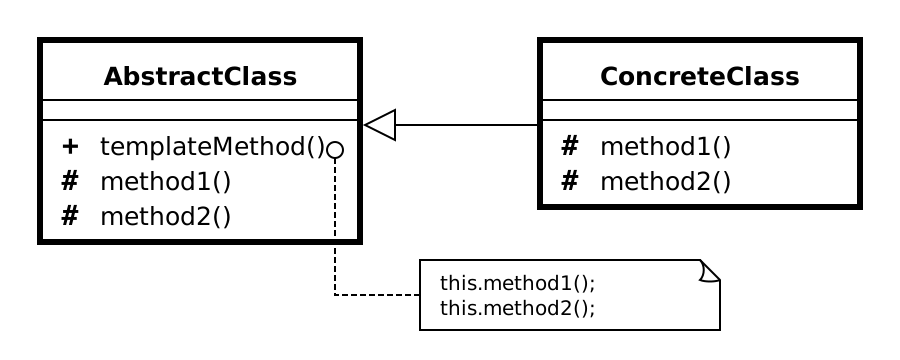
このサイトの実装(文字/文字列の枠付き表示)での対応関係:
classDiagram
  class AbstractDisplay {
    <<abstract>>
    +open()
    +print()
    +close()
    +display()
  }
  class CharDisplay {
    -ch char
    +open()
    +print()
    +close()
  }
  class StringDisplay {
    -string String
    -width int
    +open()
    +print()
    +close()
    -printLine()
  }
  AbstractDisplay <|-- CharDisplay
  AbstractDisplay <|-- StringDisplay
やり方
- 実装は決めないが呼び出し順は決めたメソッドを持つ抽象クラスを作成する
- 実装内容を決めない抽象メソッドを配置する
- サブクラスからしか呼べないように可視性をprotectedにしておくとなお良し
- 抽象クラス内に抽象メソッドの呼び出し順を定義した具体メソッドを配置する。これがテンプレートメソッド
- Javaなら、これをfinalでオーバーライド不可にして置くとなお良し
- 継承し、抽象メソッドをオーバーライド
- クライアントからはテンプレートメソッドを呼び出す
メリット(用途)
抽象クラスのテンプレートメソッドに誤りが見つかったら、(具象には手をつけず)それだけ直せば済む。 もしコピペ実装していたら修正クラスファイルが増える。
ユースケース
単体テストフレームワーク
beforeEachして、testHogehogeして、afterEachする。この順番はフレームワーク内で決められているので、TemplateMethodそのものであるが、フレームワークではなくユーザが中身を書く。
関連パターン
Factory Method
Template Methodをインスタンス生成に使うとFactory Method。
Strategy
- Template Method : 継承によりプログラムの動作を変更
- スーパクラスで大枠の振る舞いを決めてサブクラスで実装
- Strategy: 委譲によりプログラムの動作を変更
- アルゴリズム全体をごっそり切り替える
Java
実装例のクラス図
classDiagram
  class AbstractDisplay {
    <<abstract>>
    +open()
    +print()
    +close()
    +display()
  }
  class CharDisplay {
    +CharDisplay()
    +open()
    +print()
    +close()
  }
  class StringDisplay {
    -string : String
    +StringDisplay()
    +open()
    +printLine()
    +print()
    +close()
  }
  AbstractDisplay <|-- CharDisplay
AbstractDisplay <|-- StringDisplaypublic abstract class AbstractDisplay {
public abstract void open();
public abstract void print();
public abstract void close();
public final void display() {
open();
for (int i = 0; i < 5; i++) {
print();
}
close();
}
}
public class CharDisplay extends AbstractDisplay {
    private char ch;

    public CharDisplay(char ch) {
        this.ch = ch;
    }

    public void open() {
        System.out.print("<<");
    }

    public void print() {
        System.out.print(ch);
    }

    public void close() {
        System.out.println(">>");
    }
}
public class StringDisplay extends AbstractDisplay {
    private String string;
    private int width;

    public StringDisplay(String string) {
        this.string = string;
        this.width = string.getBytes().length;
    }

    public void open() {
        printLine();
    }

    public void print() {
        System.out.println("|" + string + "|");
    }

    public void close() {

    }

    private void printLine() {
        System.out.print("+");
        for (int i = 0; i < width; i++) {
            System.out.print("-");
        }
        System.out.println("+");
    }
}
public class Main {
    public static void main(String[] args) {
        AbstractDisplay d1 = new CharDisplay('H');
        AbstractDisplay d2 = new StringDisplay("Hello, world.");
        AbstractDisplay d3 = new StringDisplay("こんにちは。");
        d1.display();
        d2.display();
        d3.display();
    }
}
Go
Displayerはinterfaceで表現。Javaのfinalなテンプレートメソッドdisplay()は、 GoではDisplay(d Displayer)のような自由関数に切り出している(Composite版の PrintList()、FactoryMethod版のCreate()と同じ考え方)。
実行: go run ./GoF/patterns/TemplateMethod/go
実装例のクラス図
classDiagram
  class Displayer {
    <<interface>>
    +Open()
    +Print()
    +Close()
  }
  class CharDisplay {
  }
  class StringDisplay {
}package main
// ---- display 層(Java版の AbstractDisplay.java に相当)----
//
// Java版AbstractDisplayは抽象クラスで、open/print/closeを抽象メソッドとして持ち、
// display()というfinalなテンプレートメソッドで「open → print×5 → close」という
// 呼び出し順を固定する。
//
// Goには継承もfinalも無いので、Composite/go・FactoryMethod/goと同じ流儀で
// 「共通のテンプレート処理を自由関数に切り出し、interfaceの実装を引数で渡す」ことで
// これを表現する。呼び出し側はDisplayerを実装するだけでDisplay自体を上書きする
// 手段が無いので、事実上finalと同じ効果になる。
//
// interface名をDisplayerにしたのは、テンプレートメソッド本体の関数名をJava版と同じ
// "Display"にしたかったため(同一パッケージにinterface DisplayとfuncDisplayは
// 名前が衝突して共存できない)。FactoryMethod/goのCreator/Createと同じ命名パターン。
// Displayer はテンプレートメソッドDisplayが呼び出す穴埋め部分の抽象。
// Java版AbstractDisplayの3つの抽象メソッド(open/print/close)に相当する。
type Displayer interface {
Open()
Print()
Close()
}
// Display はJava版 AbstractDisplay.display()(finalなテンプレートメソッド)相当。
func Display(d Displayer) {
d.Open()
for i := 0; i < 5; i++ {
d.Print()
}
d.Close()
}
package main

import "fmt"

// ---- chardisplay 層(Java版の CharDisplay.java に相当)----

// CharDisplay は1文字を"<<"と">>"で挟んで表示するDisplayer実装。
type CharDisplay struct {
	ch rune
}

// NewCharDisplay はコンストラクタ相当。
func NewCharDisplay(ch rune) *CharDisplay {
	return &CharDisplay{ch: ch}
}

func (c *CharDisplay) Open() {
	fmt.Print("<<")
}

func (c *CharDisplay) Print() {
	fmt.Print(string(c.ch))
}

func (c *CharDisplay) Close() {
	fmt.Println(">>")
}
package main

import (
	"fmt"
	"strings"
)

// ---- stringdisplay 層(Java版の StringDisplay.java に相当)----

// StringDisplay は文字列を罫線("+---+")で囲んで表示するDisplayer実装。
type StringDisplay struct {
	str   string
	width int
}

// NewStringDisplay はコンストラクタ相当。
// widthはJava版 string.getBytes().length (デフォルトエンコーディングでのバイト長)
// に相当する値。GoのlenはUTF-8バイト長を返すため、Javaのデフォルトエンコーディングが
// UTF-8である場合とそのまま対応する(マルチバイト文字を含む文字列では、罫線の長さが
// 見た目の文字数より長くなる。これはJava版オリジナルの挙動を踏襲したもの)。
func NewStringDisplay(str string) *StringDisplay {
	return &StringDisplay{str: str, width: len(str)}
}

func (s *StringDisplay) Open() {
	s.printLine()
}

func (s *StringDisplay) Print() {
	fmt.Println("|" + s.str + "|")
}

func (s *StringDisplay) Close() {
	// Java版と同様、closeでは何もしない。
}

func (s *StringDisplay) printLine() {
	fmt.Println("+" + strings.Repeat("-", s.width) + "+")
}
package main

// 実行: go run ./GoF/patterns/TemplateMethod/go
//
// Java版Main.javaと同じ3つのDisplayer(CharDisplay1個・StringDisplay2個)を
// テンプレートメソッドDisplay経由で表示する。
func main() {
	d1 := NewCharDisplay('H')
	d2 := NewStringDisplay("Hello, world.")
	d3 := NewStringDisplay("こんにちは。")
	Display(d1)
	Display(d2)
	Display(d3)
}
PHP
実装例のクラス図
classDiagram
  class AbstractAction {
    <<abstract>>
    +__construct()
    +validate()
    +doMain()
    +doAction()
    +assign()
    +getAssigned()
  }
  class UserIndexAction {
    +__construct()
    +validate()
    +doMain()
  }
  class UserEntryAction {
    +__construct()
    +validate()
    +doMain()
  }
  class ModelFactory {
    +__construct()
    +create()
  }
  class User {
    +__construct()
    +__set()
    +__get()
    +save()
  }
  AbstractAction <|-- UserIndexAction
AbstractAction <|-- UserEntryAction<?php
function say($i)
{
print "$i \n";
}
// template method
/**
* 処理の流れの法則性と具体的な実装を分けることで汎用性を持たせる
*
*/
abstract class AbstractAction
{
private $request = null;
private $session = array();
private $assigned = array();
private $errors = array();
private $errorPageName = "error.view";
private $modelFactory = null;
public function __construct()
{
}
// 入力値の検証
abstract function validate();
// 実処理
abstract function doMain();
/**
*
* 入力値を検証してエラーページに遷移するか
* 実処理を行うかを処理
* この部分がテンプレートメソッド
* validateして、その結果から
* エラーを投げるかdomainを呼び出すという手順はまとめている
* @return void
*/
public function doAction()
{
if (!$this->validate()) return $this->errorPageName;
return $this->doMain();
}
public function assign($key, $val)
{
$this->assigned[$key] = $val;
}
public function getAssigned($key)
{
return $this->assigned[$key];
}
public function getRequestValue($key)
{
return @$this->request[$key];
}
public function setSessionValue($key, $val)
{
$this->session[$key] = $val;
}
public function getSessionValue($key)
{
return @$this->session[$key];
}
public function setRequest($request)
{
if (!is_array($request)) throw new Exception("配列じゃないじゃないか", 1);
if ($this->request) {
throw new Exception("すでに設定されてるじゃないか");
}
$this->request = $request;
}
public function setSession($session)
{
if (!is_array($session)) throw new Exception("配列じゃないじゃないか", 1);
if ($this->session) {
throw new Exception("すでに設定されてるじゃないか");
}
$this->session = $session;
}
public function setError($key, $val)
{
$this->errors[$key] = $val;
}
public function getError($key)
{
return $this->errors[$key];
}
public function hasError()
{
return count($this->errors);
}
public function getErrors()
{
return $this->errors;
}
public function getModel($key)
{
return $this->modelFactory->create($key);
}
public function setModelFactory($obj)
{
if (!$obj instanceof ModelFactory) {
throw new Exception("こんなオブジェクト無理だ");
}
$this->modelFactory = $obj;
}
}
// /user/index 実装クラス
class UserIndexAction extends AbstractAction
{
public function __construct()
{
}
public function validate()
{
return true;
}
public function doMain()
{
return "index.view";
}
}
// /user/entry
class UserEntryAction extends AbstractAction
{
protected $errorPageName = "redirect: /UserForm";
public function __construct()
{
}
public function validate()
{
if (!$this->getRequestValue("name")) {
$this->setError("name", "not_required");
}
if (!$this->getRequestValue("mail_address")) {
$this->setError("mail_address", "not_required");
} elseif (!preg_match("/^[a-zA-Z0-9.!#$%&'*+\/=?^_`{|}~-]+@[a-zA-Z0-9-]+(?:\.[a-zA-Z0-9-]+)*$/", $this->getRequestValue("mail_address"))) {
$this->setError("mail_address", "invalid_format");
}
return !$this->hasError();
}
public function doMain()
{
$user = $this->getModel("User");
$this->name = $this->getRequestValue("name");
$this->mail_address = $this->getRequestValue("mail_address");
$user->save();
$this->assign("User", $user);
return "redirect: /UserFinished";
}
}
class ModelFactory
{
public function __construct()
{
}
public function create($class)
{
return new $class;
}
}
class User
{
private $values = array();
public function __construct()
{
}
public function __set($key, $val)
{
$this->values[$key] = $val;
}
public function __get($key)
{
return $this->values["key"];
}
public function save()
{
return true;
}
}
// indexが普通に走る
$index = new UserIndexAction();
$index->setModelFactory(new ModelFactory());
say($index->validate() == true ? "OK" : "NG");
say($index->doMain() == "index.view" ? "OK" : "NG");
// validateに引っかからないのでdoMainが実行される
say($index->doAction() == "index.view" ? "OK" : "NG");
// entryがvalidateで引っかかるテスト
// nameとemailが未入力の状態でPOSTされる
$entry = new UserEntryAction();
$entry->setModelFactory(new ModelFactory());
say($entry->validate() == false ? "OK" : "NG");
say($entry->getError("name") == "not_required" ? "OK" : "NG");
say($entry->getError("mail_address") == "not_required" ? "OK" : "NG");
// entryがvalidateで引っかかるテスト
// email未入力
$entry = new UserEntryAction();
$entry->setModelFactory(new ModelFactory());
$entry->setRequest(array("name" => "hoge"));
say($entry->validate() == false ? "OK" : "NG");
say($entry->getError("mail_address") == "not_required" ? "OK" : "NG");
// name emailどちらもある format error
$entry = new UserEntryAction();
$entry->setModelFactory(new ModelFactory());
$entry->setRequest(array("name" => "hoge", "mail_address" => "hoge"));
say($entry->validate() == false ? "OK" : "NG");
say($entry->getError("mail_address") == "invalid_format" ? "OK" : "NG");
// name email 正しくぽすと
$entry = new UserEntryAction();
$entry->setModelFactory(new ModelFactory());
$entry->setRequest(array("name" => "hoge", "mail_address" => "sayuen0@gmail.com"));
say($entry->validate() == true ? "OK" : "NG");
say($entry->doAction() == "redirect: /UserFinished" ? "OK" : "NG");
$entry->assign("User", new User());
$user = $entry->getAssigned("User");
say($user instanceof User ? "OK" : "NG");
say($user->name == "hoge" ? "OK" : "NG");
say($user->mail_address == "sayuen0@gmail.com" ? "OK" : "NG");
echo $user->name;
// webで実行する際は
// $class = new class();
// $class->setRequest($_REQUEST);
// $class->setSession($_SESSION);
// $view = $class->doAction()
// $_SESSION = $this->getSession();
// 大事なのは、doActionとすればvalidateしてdomainが呼び出されることが共通化されている点。TypeScript
abstract class AbstractDisplayにdisplay()というテンプレートメソッドを実装し、 サブクラスだけが実装すべきopen/print/closeを抽象メソッドにする、というJava版 そのままの設計。
実行: npx tsx GoF/patterns/TemplateMethod/typescript/main.ts
実装例のクラス図
classDiagram
  class AbstractDisplay {
    <<abstract>>
    +open()
    +print()
    +close()
    +display()
  }
  class CharDisplay {
    +constructor()
    +open()
    +print()
    +close()
  }
  class StringDisplay {
    +constructor()
    +open()
    +print()
    +close()
    -printLine()
  }
  AbstractDisplay <|-- CharDisplay
AbstractDisplay <|-- StringDisplay// Template Method パターン: display層 (Java版の AbstractDisplay.java 相当)
// 単体では実行不可。エントリポイントは main.ts (npx tsx main.ts)。
//
// Java版のAbstractDisplayは抽象クラスで、open/print/closeを抽象メソッドとして持ち、
// display()というfinalなテンプレートメソッドで「open → print×5 → close」という
// 呼び出し順を固定する。TypeScriptにもabstractクラスがあるので、Composite/FactoryMethod
// 版TS実装と同じ方針でJava版のクラス階層をほぼそのまま書ける
// (Go版のように共通処理を自由関数へ外出しする必要がない)。
//
// TypeScriptにはJavaのfinalに相当するメソッド修飾子は無いため、「displayは
// サブクラスで上書きしないでね」というJava版の設計意図はコメントで伝えるにとどめる。
export abstract class AbstractDisplay {
abstract open(): void;
abstract print(): void;
abstract close(): void;
// Java版 display()(final) 相当のテンプレートメソッド。
display(): void {
this.open();
for (let i = 0; i < 5; i++) {
this.print();
}
this.close();
}
}
// CharDisplay層 (Java版の CharDisplay.java 相当)
// 単体では実行不可。エントリポイントは main.ts (npx tsx main.ts)。

import { AbstractDisplay } from "./abstractdisplay";

// CharDisplay: 1文字を"<<"と">>"で挟んで表示するAbstractDisplay実装。
export class CharDisplay extends AbstractDisplay {
  constructor(private readonly ch: string) {
    super();
  }

  // Java版 System.out.print (改行なし) 相当なので process.stdout.write を使う。
  open(): void {
    process.stdout.write("<<");
  }

  print(): void {
    process.stdout.write(this.ch);
  }

  close(): void {
    console.log(">>");
  }
}
// StringDisplay層 (Java版の StringDisplay.java 相当)
// 単体では実行不可。エントリポイントは main.ts (npx tsx main.ts)。

import { AbstractDisplay } from "./abstractdisplay";

// StringDisplay: 文字列を罫線("+---+")で囲んで表示するAbstractDisplay実装。
export class StringDisplay extends AbstractDisplay {
  private readonly width: number;

  constructor(private readonly str: string) {
    super();
    // Java版 string.getBytes().length (デフォルトエンコーディングでのバイト長) 相当。
    // JS/TSのstring.lengthはUTF-16コードユニット数なので、TextEncoderでUTF-8バイト長を
    // 計算し直す(マルチバイト文字を含む文字列では、罫線の長さが見た目の文字数より
    // 長くなる。これはJava版オリジナルの挙動を踏襲したもの)。
    this.width = new TextEncoder().encode(str).length;
  }

  open(): void {
    this.printLine();
  }

  print(): void {
    console.log(`|${this.str}|`);
  }

  close(): void {
    // Java版と同様、closeでは何もしない。
  }

  private printLine(): void {
    console.log(`+${"-".repeat(this.width)}+`);
  }
}
// Template Method パターン: 文字/文字列の反復表示 (Java版Main.javaと同じお題)
//
// 実行: npx tsx GoF/patterns/TemplateMethod/typescript/main.ts

import { CharDisplay } from "./chardisplay";
import { StringDisplay } from "./stringdisplay";

function main(): void {
  const d1 = new CharDisplay("H");
  const d2 = new StringDisplay("Hello, world.");
  const d3 = new StringDisplay("こんにちは。");
  d1.display();
  d2.display();
  d3.display();
}

main();
Python
AbstractDisplay(ABC)にJava版と同じ形でdisplay()を実装する。
実行: python3 GoF/patterns/TemplateMethod/python/main.py
実装例のクラス図
classDiagram
  class AbstractDisplay {
    +AbstractDisplay()
    +open()
    +print()
    +close()
    +display()
  }
  class CharDisplay {
    +CharDisplay()
    +__init__()
    +open()
    +print()
    +close()
  }
  class StringDisplay {
  }
  AbstractDisplay <|-- CharDisplay
AbstractDisplay <|-- StringDisplay"""Template Method パターン: display層 (Java版の AbstractDisplay.java 相当)
単体では実行不可。エントリポイントは main.py (python3 main.py)。
Java版のAbstractDisplayは抽象クラスで、open/print/closeを抽象メソッドとして持ち、
display()というfinalなテンプレートメソッドで「open → print×5 → close」という
呼び出し順を固定する。PythonにはJavaのinterfaceに相当する言語機能は無いため、
Composite/FactoryMethod版Python実装と同じ方針で抽象基底クラス(ABC, abcモジュール)を
使う。finalに相当する機構も無いため、「displayはテンプレートメソッドなので
サブクラスで上書きしないでね」というJava版の設計意図はコメントで伝えるにとどめる。
"""
from __future__ import annotations
from abc import ABC, abstractmethod
class AbstractDisplay(ABC):
@abstractmethod
def open(self) -> None: ...
@abstractmethod
def print(self) -> None: ...
@abstractmethod
def close(self) -> None: ...
def display(self) -> None:
"""Java版 display()(final) 相当のテンプレートメソッド。"""
self.open()
for _ in range(5):
self.print()
self.close()
"""CharDisplay層 (Java版の CharDisplay.java 相当)

単体では実行不可。エントリポイントは main.py (python3 main.py)。
"""

from __future__ import annotations

from abstractdisplay import AbstractDisplay


class CharDisplay(AbstractDisplay):
    """CharDisplay: 1文字を"<<"と">>"で挟んで表示するAbstractDisplay実装。"""

    def __init__(self, ch: str) -> None:
        self._ch = ch

    def open(self) -> None:
        print("<<", end="")

    def print(self) -> None:
        print(self._ch, end="")

    def close(self) -> None:
        print(">>")
"""StringDisplay層 (Java版の StringDisplay.java 相当)

単体では実行不可。エントリポイントは main.py (python3 main.py)。
"""

from __future__ import annotations

from abstractdisplay import AbstractDisplay


class StringDisplay(AbstractDisplay):
    """StringDisplay: 文字列を罫線("+---+")で囲んで表示するAbstractDisplay実装。"""

    def __init__(self, string: str) -> None:
        self._string = string
        # Java版 string.getBytes().length (デフォルトエンコーディングでのバイト長) 相当。
        # Pythonのlenはコードポイント数なので、UTF-8エンコードしてバイト長を取り直す
        # (マルチバイト文字を含む文字列では、罫線の長さが見た目の文字数より長くなる。
        # これはJava版オリジナルの挙動を踏襲したもの)。
        self._width = len(string.encode("utf-8"))

    def open(self) -> None:
        self._print_line()

    def print(self) -> None:
        print(f"|{self._string}|")

    def close(self) -> None:
        pass  # Java版と同様、closeでは何もしない。

    def _print_line(self) -> None:
        print(f"+{'-' * self._width}+")
"""Template Method パターン: 文字/文字列の反復表示 (Java版Main.javaと同じお題)

実行: python3 main.py
      (もしくはリポジトリルートから python3 GoF/patterns/TemplateMethod/python/main.py)
"""

from __future__ import annotations

from chardisplay import CharDisplay
from stringdisplay import StringDisplay


def main() -> None:
    d1 = CharDisplay("H")
    d2 = StringDisplay("Hello, world.")
    d3 = StringDisplay("こんにちは。")
    d1.display()
    d2.display()
    d3.display()


if __name__ == "__main__":
    main()